|
||||||||||
| PREV CLASS NEXT CLASS | FRAMES NO FRAMES | |||||||||
| SUMMARY: NESTED | FIELD | CONSTR | METHOD | DETAIL: FIELD | CONSTR | METHOD | |||||||||
public interface ValuesEditor
Implemented by Swing editors which are designed for a particular class of objects.
This interface attempts to define the minimal functionality in
which a class can provide a graphical editor for the
configurable/state values of a particular object. It extends the
ValuesHolder class with the following purpose:
JComponent.factory
for the objects it is designed to work with.validate the user input
without actually risking the transfer of information is
provided.A ValuesEditor implementation has the following
"contractual rules":
ValuesHolder interface which it extends.createObjectInstance method must return a
new instance of a object which can be used as a parameter to both
the toObject and fromObject
methods.init method is option. A implementation
choose to do nothing in its implementation of the init method. Likewise, a user of the implementation does not need
to invoke the init method. However, it provides the
opportunity to customize strings (typically by converting a resource bundle into a lookup object). One will need to refer to the
documentation for the implementation to see what parameters are
available.validate method is successful (returns
true), then the toObject method should not throw
a IllegalStateException (you should be able to transfer
values from the editor to a object if the user input is
valid). This doesn't turn out to be that difficult to implement
(typically the first thing your toObject
implementation will do is invoke your validate
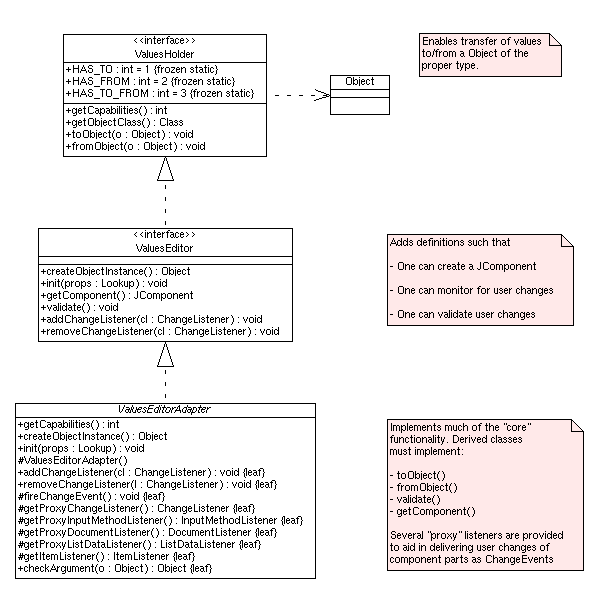
method.The following UML diagram provides a overview of how this class "fits" in to the scheme of things:
You should be able to use the View utility to
verify the behavior of ANY implementation of this interface:
java com.ccg.values.View -class CLASS [CLASS_SETTINGS]
For example, to try out the TimeSpanEditor and adjust the labels, one
could use:
 java com.ccg.values.View -class com.ccg.values.stock.TimeSpanEditor \
   -start.label "Search From: " -end.label "Until: "
| Field Summary |
|---|
| Fields inherited from interface com.ccg.values.ValuesHolder |
|---|
HAS_FROM, HAS_TO, HAS_TO_FROM |
| Method Summary | |
|---|---|
void |
addChangeListener(ChangeListener cl)
Add a "change listener" to notify if the user modifies ANY of the values in the Swing component. |
Object |
createObjectInstance()
Creates a new instance of a object (with default values set) which the editor is designed to work with. |
JComponent |
getComponent()
Get the Swing component which the user sees. |
void |
init(Lookup props)
Set the properties to be used when constructing the visual component. |
void |
removeChangeListener(ChangeListener cl)
Add a "change listener" to notify if the user modifies ANY of the values in the Swing component. |
void |
validate()
Verify that all of the user input fields are valid. |
| Methods inherited from interface com.ccg.values.ValuesHolder |
|---|
fromObject, getCapabilities, getObjectClass, toObject |
| Method Detail |
|---|
Object createObjectInstance()
This is method should ALWAYS be implemented when possible and
is a requirement for the ValuesEditor
implementation to be used in "factories".
fromObject or toObject implementation. Never returns null.void init(Lookup props)
Implementations may optionally implement this method (it doesn't need to do anything). It allows one to pass a set of properties which the implementation may optionally use when constructing its visual component.
The properties recognized (if any) are implementation dependent. Typically these properties include custom labels, tooltips, format rules, etc.
If this method is invoked (it is not required), it must
be invoked prior to the invocation of the getComponent method (otherwise it would be too
late now wouldn't it).
props - Set of properties (implementation dependent) to initialize
object with (must not be null).
JComponent getComponent()
                        throws IllegalStateException
All classes which implement this interface need to be able to create a GUI editor.
The first invocation triggers the "creation" of the component.
Multiple invocations will return a reference to the same component as returned by the first invocation.
IllegalStateException - If the object was not properly initialized.
void validate()
              throws IllegalStateException
After allowing the user to modify the fields, it is often
desirable to "validate" what the user has entered. This method
checks the data entered by the user. If any of the user
information looks bad, it throws an IllegalStateException.
IllegalStateException - If any of the user input fields have invalid values contained
which the user needs to fix prior to a commit.ValuesHolder.toObject(java.lang.Object)void addChangeListener(ChangeListener cl)
This method allows developers to determine when the state of the graphical component becomes "dirty" (modified by the user).
cl - The ChangeListener to notify of
modifications.void removeChangeListener(ChangeListener cl)
cl - The ChangeListener to remove from the
notification list.
|
||||||||||
| PREV CLASS NEXT CLASS | FRAMES NO FRAMES | |||||||||
| SUMMARY: NESTED | FIELD | CONSTR | METHOD | DETAIL: FIELD | CONSTR | METHOD | |||||||||